Reverse DNS & PTR Records Explained: Forward vs. Reverse Lookups
In the vast, interconnected world of the internet, the Domain Name System (DNS) acts as its essential phonebook, translating human-readable domain names into machine-readable IP addresses. This fundamental process, known as a forward DNS lookup, is what allows you to type 'worldip.io' into your browser and reach our website.
However, the DNS system is more sophisticated than just a one-way street. There's an equally important, though often less understood, mechanism called Reverse DNS, which performs the opposite function: translating an IP address back into a domain name. This capability, powered by PTR records, is crucial for various internet services, from email delivery to network security. Let's delve into the mechanics of Reverse DNS and understand why it's so vital.
Understanding DNS: The Internet's Phonebook
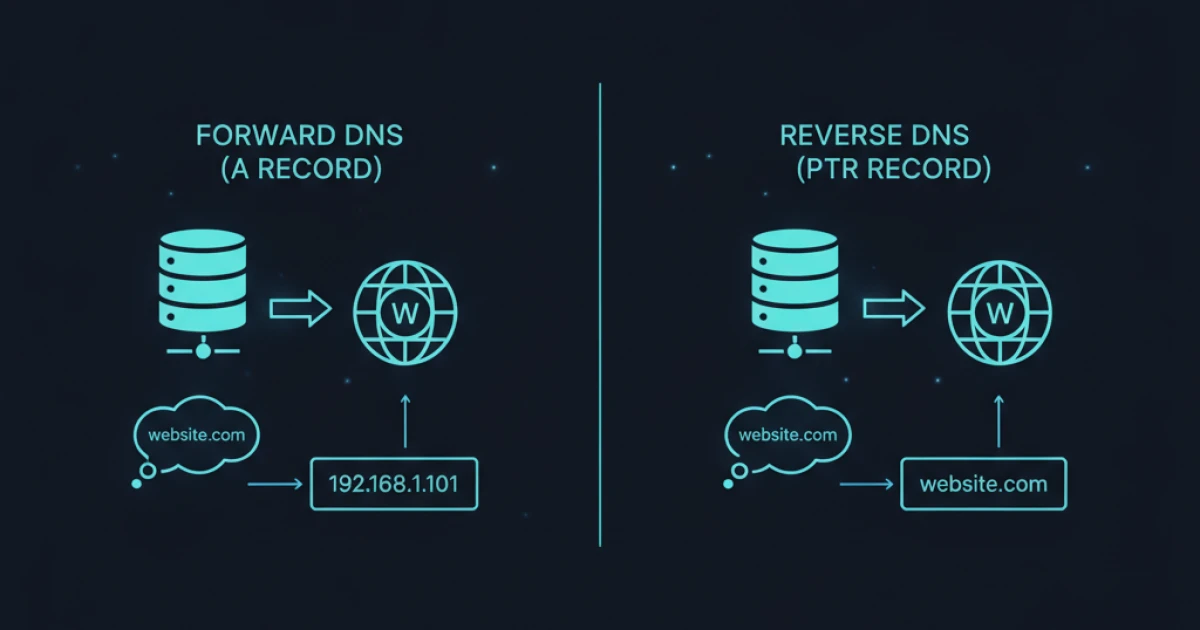
Before we dive into reverse lookups, it's essential to grasp the basics of a forward DNS lookup. When you access a website or send an email, your computer needs to know the IP address of the server it wants to communicate with. Since humans remember names better than numbers, we use domain names like example.com.
A forward DNS lookup involves:
- Your computer querying a DNS resolver for the IP address associated with a domain name.
- The DNS resolver traversing the DNS hierarchy (root, TLD, authoritative name servers).
- The authoritative name server for the domain returning the IP address, typically stored in an A record (for IPv4) or AAAA record (for IPv6).
This process is seamless and happens millions of times a second globally. Tools like WorldIP.io's IP lookup can instantly show you the IP address associated with a domain or your own public IP.
What is Reverse DNS?
Reverse DNS (rDNS) is the process of resolving an IP address back into its corresponding domain name. Instead of asking "What's the IP for example.com?", a reverse DNS lookup asks "What's the domain name for 192.0.2.1?".
While forward lookups are used for nearly every internet interaction, reverse lookups serve specific, critical purposes, primarily related to verification, logging, and security. They provide a layer of accountability by allowing systems to identify the hostname associated with an incoming IP address.
PTR Records: The Key to Reverse Lookups
Just as A records map domain names to IP addresses, PTR (Pointer) records are the fundamental building blocks of Reverse DNS. PTR records map an IP address to a hostname.
However, the DNS system isn't designed to directly query IP addresses. To facilitate reverse lookups, a special domain called in-addr.arpa (for IPv4) or ip6.arpa (for IPv6) is used. IP addresses are reversed and appended to this domain.
How PTR Records Work (IPv4 Example):
Consider the IPv4 address 192.0.2.1. To create its corresponding PTR record entry, the IP address is reversed, and .in-addr.arpa is appended:
- Original IP:
192.0.2.1 - Reversed IP:
1.2.0.192 - PTR record domain:
1.2.0.192.in-addr.arpa
When a system performs a reverse lookup for 192.0.2.1, it queries for the PTR record associated with 1.2.0.192.in-addr.arpa. If a PTR record exists, it will return the associated hostname, for example, mail.example.com.
It's important to note that PTR records are managed by the owner of the IP address block, typically an Internet Service Provider (ISP), hosting provider, or a large organization that has its own IP assignments. WorldIP.io provides instant reverse-DNS/PTR lookups directly on our tools page, allowing you to quickly check the PTR record for any IP address.
Forward vs. Reverse Lookups: A Crucial Distinction
The difference between forward and reverse lookups is fundamental:
- Forward Lookup (A/AAAA records): Maps a domain name to an IP address. (e.g.,
worldip.io→104.21.90.106) - Reverse Lookup (PTR records): Maps an IP address to a domain name (hostname). (e.g.,
104.21.90.106→some-host.worldip.io)
While a forward lookup for a domain will always return an IP address if the domain exists, a reverse lookup for an IP address might not always return a hostname. This is because PTR records are not mandatory for all IP addresses. Many residential IP addresses, for instance, might not have specific PTR records, or they might resolve to a generic hostname provided by the ISP.
Why Are Reverse DNS and PTR Records Important?
The existence and correctness of PTR records are crucial for several reasons:
- Email Server Validation (Anti-Spam): This is perhaps the most significant use case. Many email servers perform a reverse DNS lookup on the IP address of an incoming mail server. If the IP address does not resolve to a valid hostname, or if the hostname doesn't match the forward DNS record (a process called forward-confirmed reverse DNS or FCrDNS), the email might be flagged as spam or rejected entirely. This helps combat spoofing and ensures the legitimacy of the sender.
- Logging and Analytics: Server logs often record the IP addresses of connecting clients. With reverse DNS, these logs can display hostnames instead of just raw IP addresses, making them much more readable and useful for analysis, troubleshooting, and identifying patterns.
- Security and Auditing: Knowing the hostname associated with an IP address can be vital for security teams investigating suspicious activity. It helps in identifying the source of attacks or unauthorized access.
- Network Troubleshooting: When diagnosing network issues, resolving an IP to a hostname can provide immediate context about the device or service involved.
- Compliance: Some regulatory or industry standards may require proper reverse DNS configuration for specific services.
For organizations managing their own IP space, correctly configuring PTR records is a fundamental aspect of network administration. WorldIP.io's ASN and Organization pages can help you identify the entities responsible for IP blocks, which is the first step in understanding who controls the PTR records for a given range.
How to Check and Manage PTR Records
Checking a PTR record is straightforward using command-line tools or online services:
- Using
dig(Linux/macOS):dig -x 192.0.2.1 - Using
nslookup(Windows/Linux/macOS):nslookup 192.0.2.1 - Online Tools: WorldIP.io offers a quick and easy reverse DNS lookup tool.
Managing PTR records, however, is not something an end-user can typically do directly. The authority to create or modify a PTR record for an IP address rests with the entity that controls the DNS for the in-addr.arpa or ip6.arpa zone corresponding to that IP block. This is almost always your ISP, hosting provider, or cloud service provider. If you need to set or change a PTR record for your server's IP, you will need to contact their support and make a request.
Reverse DNS and PTR records, while often in the background, are indispensable components of a healthy and secure internet. They provide a vital layer of verification and context, ensuring that email reaches its destination, logs are intelligible, and network interactions are more transparent. Understanding their function is key to mastering the intricacies of internet infrastructure.
